
Chain Store Management System
The JetPlus system is a complete retail and wholesale solution that integrates online and offline sales, inventory management, financial accounting and HR management, helping businesses manage multiple branches efficiently and expand. System integration connects your data to improve operating efficiency and decision-making.

Seamless Data Integration
Stores and head office are linked in real time over a fixed IP, and product data is maintained once in the head-office system and applied to every store, with no repeated entry branch by branch.

International Business Integration
Supports overseas branches: users can set custom exchange rates for each country and different currency prices for the same item, and can view franchise stock and supply franchisees on a wholesale basis.

WiFi and Offline Mode
MePOS works independently offline and can still issue invoices without a connection; once the network is restored, data is sent back to the JetPlus head-office system automatically. Short-term roadshow stores can also transfer data over WiFi.

Complete Member Management
Covers member type settings, member reward and penalty schemes, points schemes, gift voucher status lookup and member mailing label printing; promotions can be given effective dates.

Precise Inventory Control
Product records include bin location and lot number, and together with stock reports and product movement lists let you trace every item from receipt to sale.

Data-driven Decisions
Custom reports can be scheduled to be emailed automatically to designated addresses, and per-store sales reports make it easy to compare branch performance.

Enhanced Data Security
User permission management ensures only authorised staff can access sensitive data, effectively reducing the risk of leaks
Data Import and Export
Product data, member data, transaction entries and more can be imported and exported via Excel, making it easy to migrate from an old system or connect with other systems. Going live usually takes 1 to 2 weeks from signing.
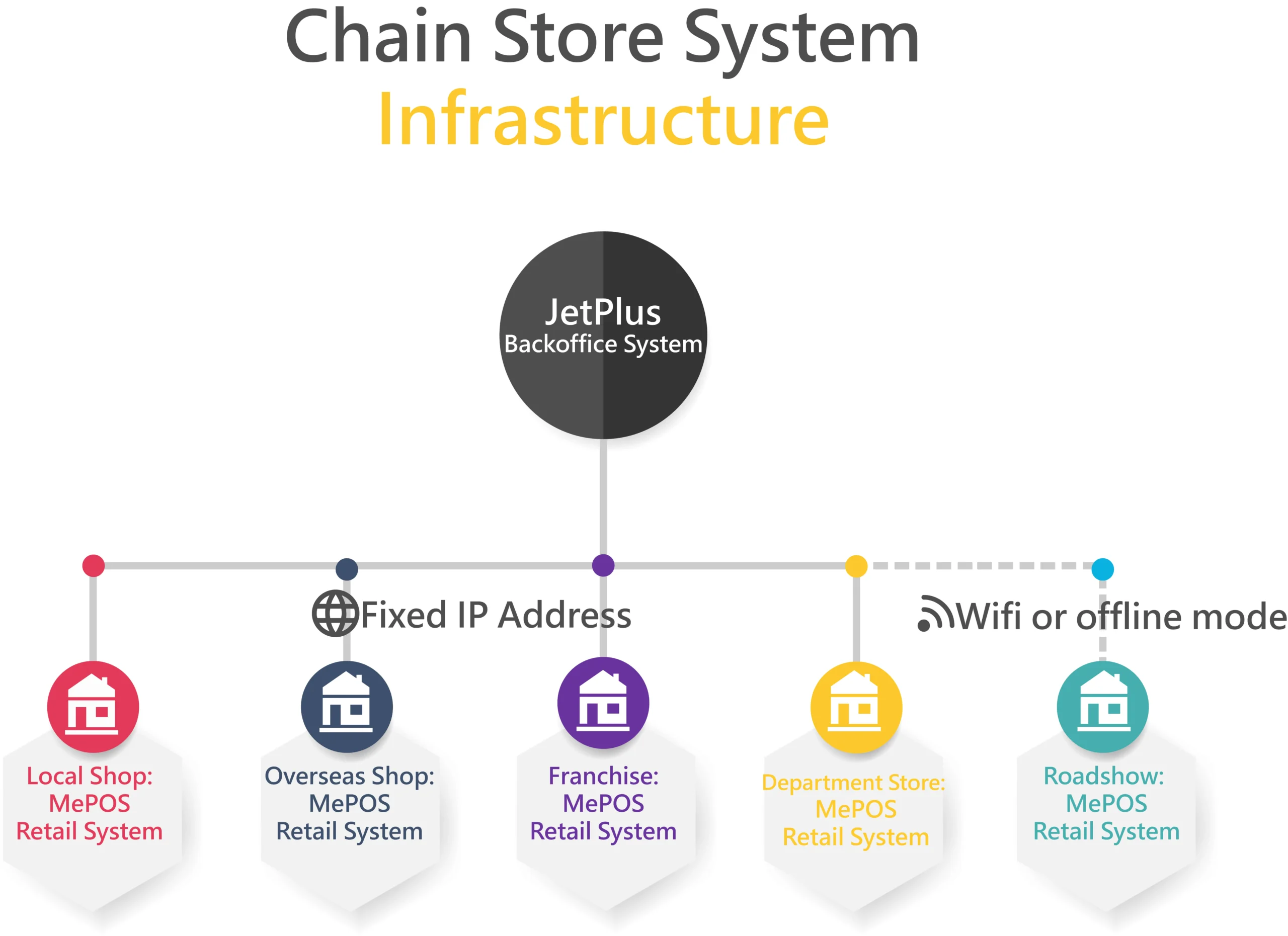
Both stores and head office need a fixed IP address to exchange data, so product data can be maintained once in the head-office system and all kinds of reports viewed there. The JetPlus head-office system proves its worth in many situations. If the business has overseas branches, users can set custom exchange rates and different currency prices for goods. The head-office system can also view franchise stock and supply franchisees on a wholesale basis. Short-term roadshow store systems can transfer data to the JetPlus head-office system over WiFi; and sinceMePOSit also works independently offline, invoices can be issued in offline mode and the data is sent to the JetPlus head-office system automatically once a connection is available.
Multi-Location Inventory and Stock Transfers
With several stores, the problem is rarely total stock. It is stock in the wrong branch. In JetPlus, product data is maintained once at head office and applied to every store. Each item record carries a bin location and lot number, and stock reports and product movement lists show where every unit went, from receipt to sale.
When one branch runs low and another is overstocked, branch staff can transfer goods directly between stores, with no approval step to wait for. Stock levels update in both branches straight away. Franchise stock can also be viewed from head office, and franchisees can be supplied on a wholesale basis.
Head-Office Consolidated Reporting
Head office sees all branches in one system, and every store’s own stock and sales figures stay available. Per-store sales reports let you compare branches side by side. You can also build custom reports and schedule them to be emailed automatically, for example a daily sales summary to the owner and a weekly stock report to the buyer. Data from any store can be exported to Excel for deeper analysis or for your accountant. Roadshow and pop-up stores that sync over WiFi feed into the same reports, so short-term locations are not left out.
Chain Store Management System Feature List
Product data maintenance
Product records include bin location and lot number
Product categories
Stock reports
Product movement list
Member type settings
Member reward and penalty scheme settings
Member points scheme settings
Member mailing label printing
Gift voucher status lookup
Sales invoice amendment
Per-store sales reports
Promotion settings with effective dates
Package settings
User permission settings
Custom exchange rates by country
All transaction data can be imported and exported via Excel (including product data, member data and transaction entries)
Custom payment methods per store
Custom reports (scheduled automatic delivery to specific email addresses)
Per-Branch Permissions, Pricing and Payment Methods
Chains need central control with local flexibility. JetPlus supports:
- User permissions, so cashiers, branch managers and head-office staff only see the data and functions their role needs.
- Per-branch pricing, so the same item can carry a different price in different branches, for example a downtown store and a suburban store.
- Branch-specific promotions with effective dates. Run a campaign in every store, or limit it to selected branches, and it starts and ends on schedule.
- Custom payment methods per store, for branches that accept different cards or wallets.
- Different prices by currency and custom exchange rates for overseas branches.
From One Store to a Chain: MePOS and the Chain Store System
Most retailers start with one shop, and our MePOS retail POS covers checkout, receipts and stock for that store. MePOS is not a dead end: when you open a second or third location, it grows into the chain store system by adding a JetPlus head-office layer. Each store keeps its own stock and reports, and head office gets the consolidated view.
| Need | Starting out: one store on MePOS | Growing: chain store system (MePOS + JetPlus head office) |
|---|---|---|
| Product and price data | Maintained in the store | Maintained once at head office and pushed to all stores, with per-branch prices when needed |
| Stock | Stock for your store | Stock per store plus a live view across branches, with direct stock transfers |
| Reports | Store sales and stock reports | Per-store reports stay available, plus head-office consolidated reports and scheduled email reports |
| Promotions | Store promotions | Chain-wide or limited to selected branches |
| Staff access | Store users | Role-based permissions across branches |
| Offline selling | Yes | Yes. Each store keeps selling offline and syncs to head office later |
| Overseas / franchise | Not needed | Multi-currency, franchise stock, wholesale supply |
Upgrading an existing MePOS store does not require re-entering data. Your products, members and history carry over, and the store checkout stays familiar to staff.
More systems to choose from
Not quite what you need?
Talk to our professional team and we will offer advice and an initial solution. Leave your contact details and enquiry topic and we will get back to you shortly. You may also wish to read ourFAQ.
Built for Multi-Location Retailers in Ontario
Running stores in Toronto, Markham and Mississauga means keeping prices, stock and staff in line across every branch. Softcube’s chain store system gives head office a live view of sales and inventory at each location, and our Toronto team can roll it out branch by branch.
- Central price and promotion control for every branch
- Stock transfers between stores and a live inventory view by location
- Offline mode that keeps each store selling if the internet goes down, then syncs automatically
- Head office reports by branch, with taxes set up for Ontario’s 13% HST
Frequently Asked Questions
What is a chain store POS system?
It is a POS where every branch connects to one head-office system. Products, prices and promotions are managed centrally, while each store sells and reports back. Softcube’s version combines MePOS at each store with JetPlus at head office.
What is the difference between this and a single-store POS?
A single store usually starts on MePOS. The chain system builds on it with a JetPlus head office that adds central product data, consolidated reports, stock transfers and role-based permissions across all locations, while each store’s own stock and reports stay available.
Can I move stock between branches?
Yes. Stock can be transferred directly between stores with no approval step, and stock levels update in both branches.
Can different branches have different prices or promotions?
Yes. The same item can have a different price in each branch, and promotions can run chain-wide or be limited to selected branches.
I already use MePOS. Do I need to re-enter my data to upgrade?
No. An existing MePOS store can be upgraded to the chain store system without re-entering its data.
Will my stores still work if the internet goes down?
Yes. MePOS works offline and can still issue invoices. When the connection returns, the data is sent to the JetPlus head-office system automatically.
Can head office get reports automatically?
Yes. Custom reports can be scheduled and emailed to set addresses, and per-store sales reports let you compare branch performance.
How long does rollout take, and can we import existing data?
Going live usually takes 1 to 2 weeks from signing. Products, members and transactions can be imported from Excel. Stores and head office need a fixed IP address to exchange data.
What software do retail chains and franchise groups use to manage multiple stores?
Most chains use a head-office system linked to a POS in every store. With Softcube, product data is maintained once in the JetPlus head-office system and applied to every branch, while each store runs MePOS at the counter and per-store sales reports let you compare branches.
Can I see each branch’s sales separately?
Yes. Per-store sales reports show each branch’s performance, and custom reports can be emailed to head office automatically on a schedule.
Can we manage franchisees and overseas branches?
Yes. Head office can view franchise stock and supply franchisees on a wholesale basis, and overseas branches can use custom exchange rates and different currency prices for the same item.
Can staff only see the data they need?
Yes. User permission management ensures only authorised staff can access sensitive data.
How do I pay for a chain store system?
It is available as a monthly subscription or one-time purchase; hardware is quoted separately.